
 Scribe
 Folio
Folio Sparkdeck
 Gridora
 Pressa
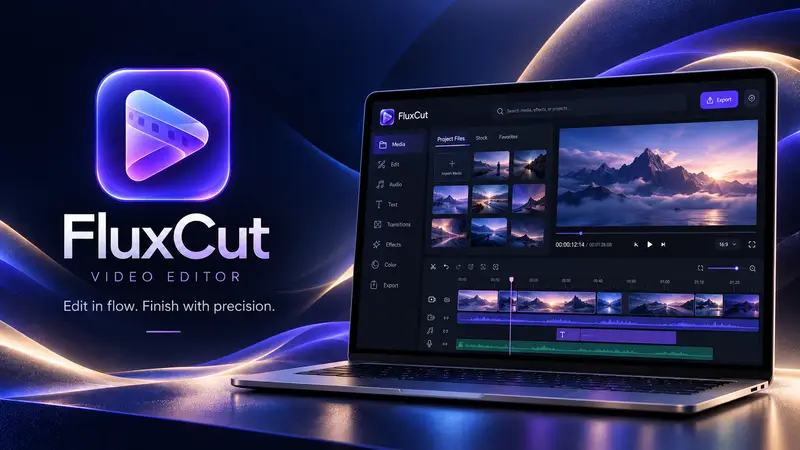
 FluxCut · Video Editor
Edit video in your browser, no download needed.
FluxCut brings a magnetic timeline, colour tools and smooth effects into one editor that runs in your browser. Your clips are kept on your own device and the export happens there too.
Free with a SEMDIV account: exports up to 1080p and 10 minutes, 3 video and 3 audio tracks, with a small watermark.
How it works
- 1
Add your clips
Drop in video, photos and audio — they stay on your device.
- 2
Cut and polish
Trim on the timeline, add transitions, titles, colour and speed.
- 3
Export MP4
Pick a size and export a finished MP4 straight from the browser.
What you can do with FluxCut
Magnetic timeline
Clips snap into place across video and audio tracks, with Premiere-style shortcuts.
30+ transitions
Dissolves, wipes, zooms, glitches and more, with adjustable timing.
Colour & effects
Looks, grading controls and effects that preview in real time.
Keyframes
Animate position, scale, rotation, opacity, colour, blur, crop and volume, with custom easing.
Animated titles
Over 20 motion-graphics templates for titles, lower thirds and banners.
Speed changes
Slow down or speed up clips with pitch-preserving audio.
Questions about FluxCut
Do I have to upload my videos?
No. Your media is stored in your browser on your own device, and the MP4 is rendered there too. Only the project timeline is saved to your account.
What does the free plan export?
MP4 files up to 1080p and 10 minutes long, with a small SEMDIV watermark.
Does it work on a laptop without a powerful GPU?
Yes. FluxCut uses your graphics chip when it can and falls back to the processor when it can't.
Which browsers work best?
Recent versions of Chrome, Edge and other Chromium browsers give the smoothest editing and export.