
 Scribe
 Folio
 Sparkdeck
 Gridora
 Pressa
 FluxCut
 Drive
 Calendar
 Todo
 Contacts
 Memo
 Chat
 Meet
 Scribe · Docs
Open old Word, OpenDocument and Rich Text files.
Got a .doc from an old computer, an .odt from LibreOffice or an .rtf from WordPad? Scribe opens them in the browser so you can read, edit and save them as a modern Word file or a PDF.
Free with a SEMDIV account: up to 20 documents.
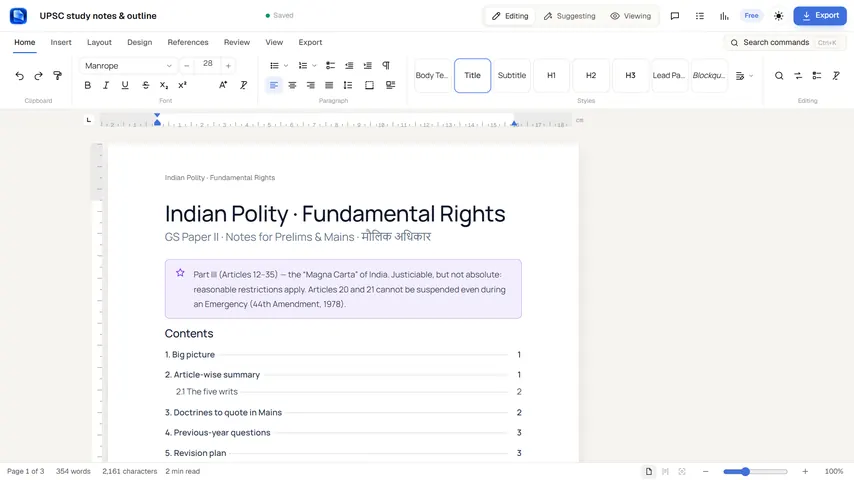
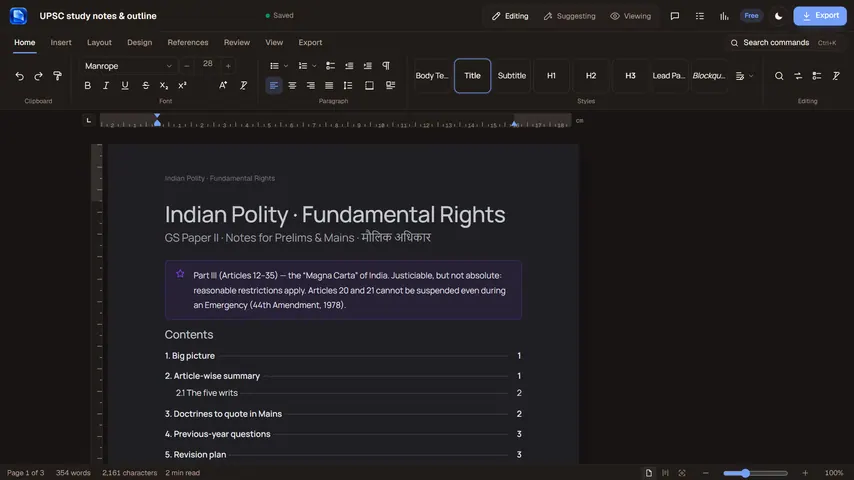
How it works
- 1
Open the file
Press Open a file in Scribe, or drop the .doc, .odt or .rtf anywhere on the page.
- 2
Edit it
Change anything on real pages with Scribe's full editor.
- 3
Save it
Export as Word (.docx), PDF, Markdown, HTML or plain text.
What you can do with Scribe
OpenDocument (.odt)
Headings, bold, italic and underline, lists, tables with merged cells, links, pictures and line breaks are kept.
Rich Text (.rtf)
Formatting, headings, bullet and numbered lists, tables, links and PNG or JPEG pictures come across.
Old Word (.doc, Word 97–2003)
The text and tables are recovered, including Hindi and other languages. Formatting from .doc files isn't kept.
Save as .docx or PDF
Turn any of them into a modern Word document or a print-ready PDF.
Nothing to install
Works in any modern browser on Windows, Mac, Linux or a Chromebook.
PDFs and Markdown too
Scribe opens .docx, PDF, Markdown, HTML and text files the same way.
More Scribe workflows
Document Editor →
Scribe is a paginated word processor with real page margins, headers, footers and cover pages — what you see on screen is how it prints. Open a Word file, collaborate with tracked changes, and export to any format.
Word (.docx) Editor →
Need to edit a `.docx` contract, resume or report without Microsoft Word installed? Scribe opens Word documents with true A4 and US Letter page boundaries, live headers and footers, tracked changes and comments — and saves straight back to `.docx` or PDF.
Academic & LaTeX Writer →
Scribe bridges the gap between Microsoft Word and LaTeX. Write on clean, paginated A4 or Letter pages with visual formatting, insert structured citations, footnotes and math equations, generate an automatic bibliography and table of contents, and export to either PDF, `.docx` or clean `.tex` source.
Online Mail Merge →
You don't need desktop Office to generate a batch of personalized offer letters, certificates or client notices. Write your template once in Scribe, insert `{{field}}` placeholders, load any CSV data table, preview each row live, and export merged documents in seconds.
PDF to Word →
A PDF is made for printing, not editing. Scribe reads where the words sit on each page and rebuilds them as paragraphs, headings and lists you can edit, then saves the result as Word (.docx).
Questions about Scribe
Can I open a .doc file without Microsoft Word?
Yes. Scribe opens Word 97–2003 .doc files and recovers their text and tables, which you can edit and save as .docx or PDF. Fonts, bold and other formatting from .doc files are not carried over.
How do I convert .odt to .docx?
Open the .odt in Scribe and export it as Microsoft Word (.docx).
Are very old or password-protected files supported?
Files from Word 6 or Word 95, and password-protected .doc files, can't be opened. Save them in a newer format first.
Is the file uploaded?
Scribe reads the file in your browser. The document you make from it is saved to your SEMDIV account so you can open it on any device.
More free tools in SEMDIV
 PressaCompress PDF files
 FolioRead, mark up and sign
 FluxCutEdit video in your browser
 GridoraA spreadsheet that thinks
 SparkdeckMake slides that move people
 DriveKeep every file safe
 CalendarPlan your days
 TodoGet the right things done
 ContactsEveryone you know
 MemoCatch the thought
 ChatPrivate messages
 MeetFace-to-face meetings